
Install WordPress In Cpanel

This tutorial is intended for domains hosted by Cpanel

If your hosting uses CPanel, chance is you will also have Fantastico installed and you may consider yourself lucky. This combination allows you to install a new WordPress blog in a matter of seconds.

fantastico

  1. Click the “Fantastico De Luxe ” Icon
  2. In the Fantastico Page,  click the “wordpress” below the “blogs” category
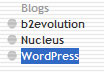
    blogsarea

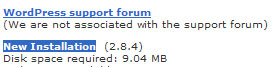
  3. Then, Click the new installationnewinstall
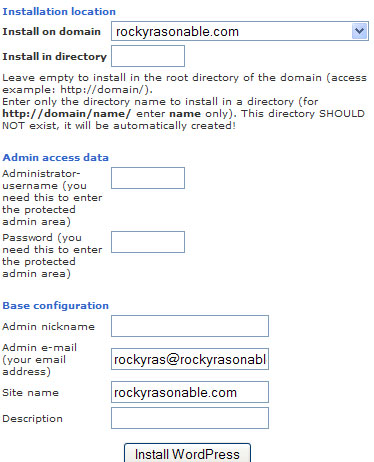
  4. Finally, Fill in the required fieldsfullinstall
  5. Then click “Install“. You are now ready to  face the word of blogging..
email

Rocky Rasonable

A filipino Senior PHP Programmer, Web Developer and Webmaster based in Davao, Philippines. Expert in Joomla, WordPress, Soholaunch, Oscommerce, Drupal, Social Media Sites, and etc.

More Posts - Website


Facebook Comment

to “Install WordPress In Cpanel”

Leave a Reply

*


Related Posts

  • MySQL – An Ultimate World-wide-web Host Database!
  • WordPress 3.0 Launched: wpdb::get_blog_prefix() error
  • Top Web Trends for 2010
  • Wordpress: ShopperPress
  • Wordpress: Change wp-admin folder name
  • Recommended CMS for newbies
Get Adobe Flash playerPlugin by wpburn.com wordpress themes

Powered by WP Robot